Logging in to DM First takes less than a minute. The process uses two things: your registered mobile number and your account password. A one-time code is sent to your phone for extra security. This guide explains the full process along with fixes for common login problems.
If you have not created an account yet, read our DM First register guide first.
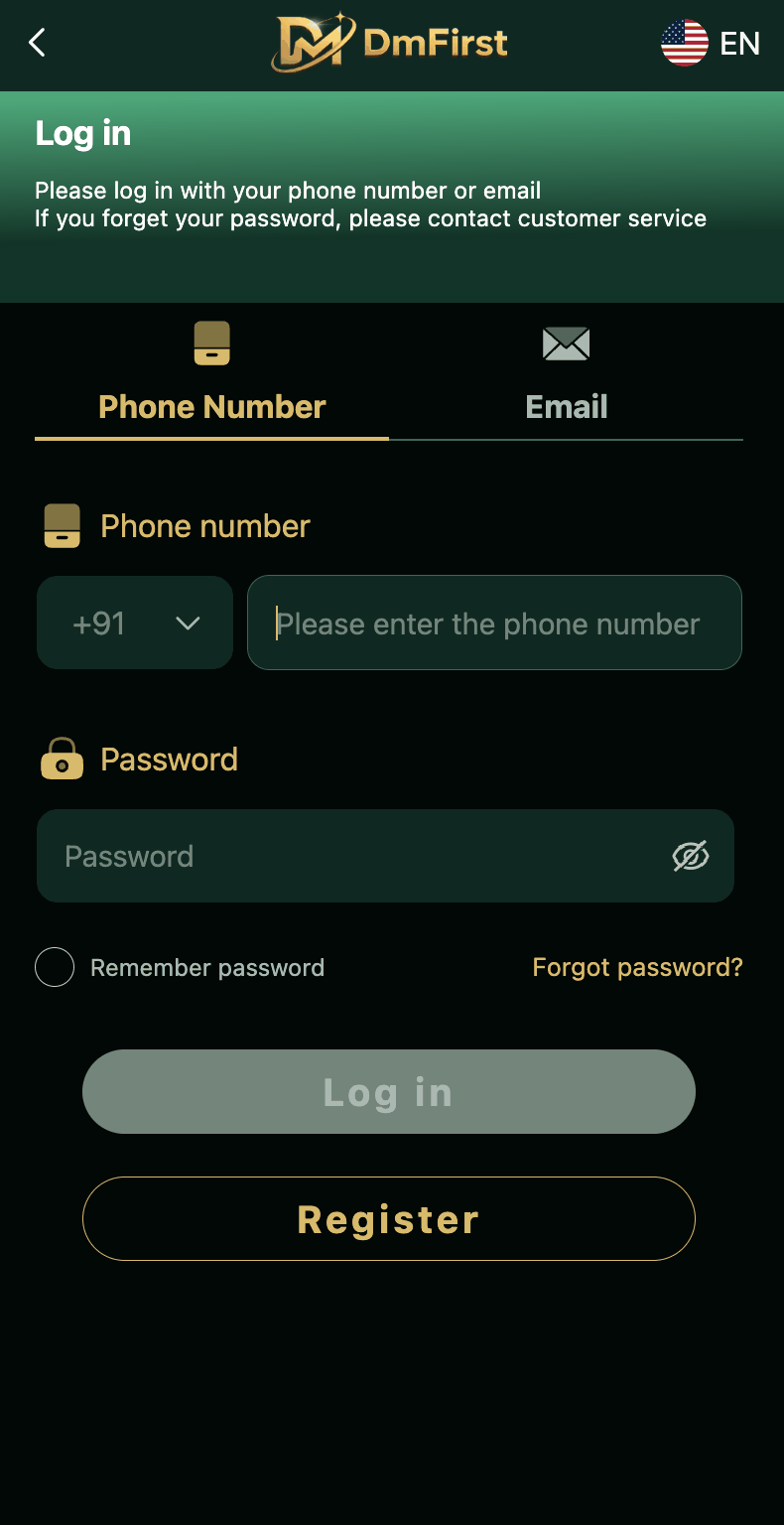
Before You Login
Keep these things ready.
Registered mobile number. Use the number you signed up with. If it has changed, contact customer service first.
Account password. The one you created during registration. If you cannot remember it, use the Forgot Password option.
Working internet. WiFi or mobile data both work. Just make sure the connection is stable.
Your phone. The OTP will arrive on your registered number, so keep the phone nearby and switched on.
Step by Step Login Process
Step 1 – Open the App or Website
Open the DM First app on your Android phone. If you have not installed it, download it from the official website. You can also use the browser version.
On the home screen, look for the Login button. It is usually at the top right or in the bottom navigation.
Step 2 – Enter Your Mobile Number
On the login page, select Phone Number. Country code +91 is already set. Type your 10 digit number without spaces.
Make sure you use the same number you registered with. A different number will receive the OTP but will not open your account.
Step 3 – Verify the OTP
Tap Send OTP. A six digit code will arrive on your phone within a few seconds. Enter it in the box provided.
The OTP is valid for sixty seconds. If it expires, tap Resend OTP to get a new one.
Step 4 – Type Your Password
Once the OTP verifies, the password field appears. Enter your password carefully. Passwords are case sensitive, so watch for capital and small letters.
Tick the Remember Password box if you want the app to save your password on that device.
Step 5 – Tap the Login Button
Tap Login. If everything matches, your dashboard opens. You are now inside the app.
From the dashboard you can access your wallet, play games, and check your history. New users should claim the registration bonus first.
Login with OTP – Full Details
OTP stands for One Time Password. It is a six digit code that is generated fresh every time you login. Once used, it cannot be used again. It expires in sixty seconds.
The OTP is delivered through SMS to your registered mobile number. Delivery usually takes ten to thirty seconds. If it takes longer, there is a problem.
The most common reasons for OTP failure:
Weak network. If your area has poor signal, SMS delivery gets delayed. Move to a better location.
DND active. If Do Not Disturb is on, transactional SMS may be blocked. Turn off DND or ask your network provider to do it.
Full SMS inbox. When your phone's message storage is full, new messages get rejected. Delete some old ones.
Wrong number. One wrong digit sends the OTP to a different phone. Double check the number you typed.
Server load. During peak hours, DM First servers handle heavy traffic. OTP may be delayed a few minutes.
For a deeper look at OTP handling, see our DM First login with OTP guide.
Forgot Password – Reset Process
If you cannot remember your password, resetting it is easy. The process takes three minutes.
Step 1: Open the DM First login page.
Step 2: Tap the Forgot Password link below the login button.
Step 3: Enter your registered mobile number and tap Send OTP.
Step 4: Enter the OTP you receive on your phone.
Step 5: Set a new password. Use at least eight characters with one capital letter, one number, and one symbol.
Step 6: Confirm and save.
You can now login with the new password. Full details are in our DM First forgot password guide.
Common Login Problems and Fixes
Login Page Not Working
Update the app to the latest version. Clear the app cache from phone settings. Try the website in a browser. If nothing works, wait fifteen to thirty minutes. Server maintenance is often the reason.
Wrong Password Error
Passwords are case sensitive. Check Caps Lock. If you cannot recall the password, use Forgot Password. Entering the wrong password three or four times can temporarily lock your account.
OTP Not Received
Check your network, turn off DND, and clear your SMS inbox. Wait a minute and tap Resend OTP. If the issue continues, contact customer service.
Account Locked
Wait fifteen to thirty minutes and try again. If the account stays locked, contact customer service. They will verify your identity and unlock it.
App Crashes on Login
Uninstall the app and reinstall the latest version. Free up storage if needed. You can also login through a browser as a temporary fix.
Session Expired
This is normal security behaviour. Login again. Ticking Remember Password reduces how often this happens.
Invalid Credentials Error
Both your mobile number and password must be correct. If they are, try resetting your password.
Login Button Greyed Out
This usually means a field is empty. Make sure both the mobile number and password fields are filled.
Page Loading Forever
Your internet speed may be slow. Switch from WiFi to mobile data or try another browser.
Account Not Found Error
You may be entering a number that was never registered. Confirm the number you used during signup. If it has changed, contact customer service.
Keeping Your Account Safe
Never share your password with anyone. Not with friends, not with family, and not with someone claiming to be from DM First support.
Never share the OTP. It only comes to your phone. If someone asks for it, it is a scam. No legitimate support team will ask for your OTP.
Avoid public WiFi networks. These are not secure.
Use a strong password. Avoid simple ones like 123456 or your birthdate.
Change your password every two to three months.
Download the app only from the official website. Avoid mod APKs and unknown sources.
Join the DM First Telegram channel for official updates and security alerts.
Logout after use if you are on a shared device.
Login vs Register – What Is the Difference
These two are not the same.
Register is done only once. It creates your account. You enter your mobile number, verify the OTP, set a password, and add an invitation code. After registration, you receive a welcome bonus.
Login is done every time you come back. You only need your mobile number and password. Register once, login always.
If you have never signed up, read our DM First register guide first.
Frequently Asked Questions
Final Words
DM First login is quick. Open the app, enter your mobile number, verify the OTP, type your password, and tap Login. Most users complete this in under a minute.
If you face any issue, refer to the fixes above. Most problems relate to network, DND, or a wrong number. If nothing works, contact customer service or join the Telegram channel.
For everything else about the platform, see our DM First game guide.