DM First handles all support through the app itself. There is no external phone number, WhatsApp line, or email address for user queries. Everything runs through the in-app Customer Service center and the official Telegram channel. This keeps interactions secure and traceable.
For deposit or withdrawal issues, the Self Service Center gets faster responses than general chat. Full details are covered in this article.
Official Support Channels
1. In-App Customer Service
Open the DM First app. Go to the Account tab. Scroll down to the Service Center section. Tap Customer Service. This opens a live chat with a support representative.
Response time is usually within a few minutes during peak hours. Live chat is best for urgent issues.
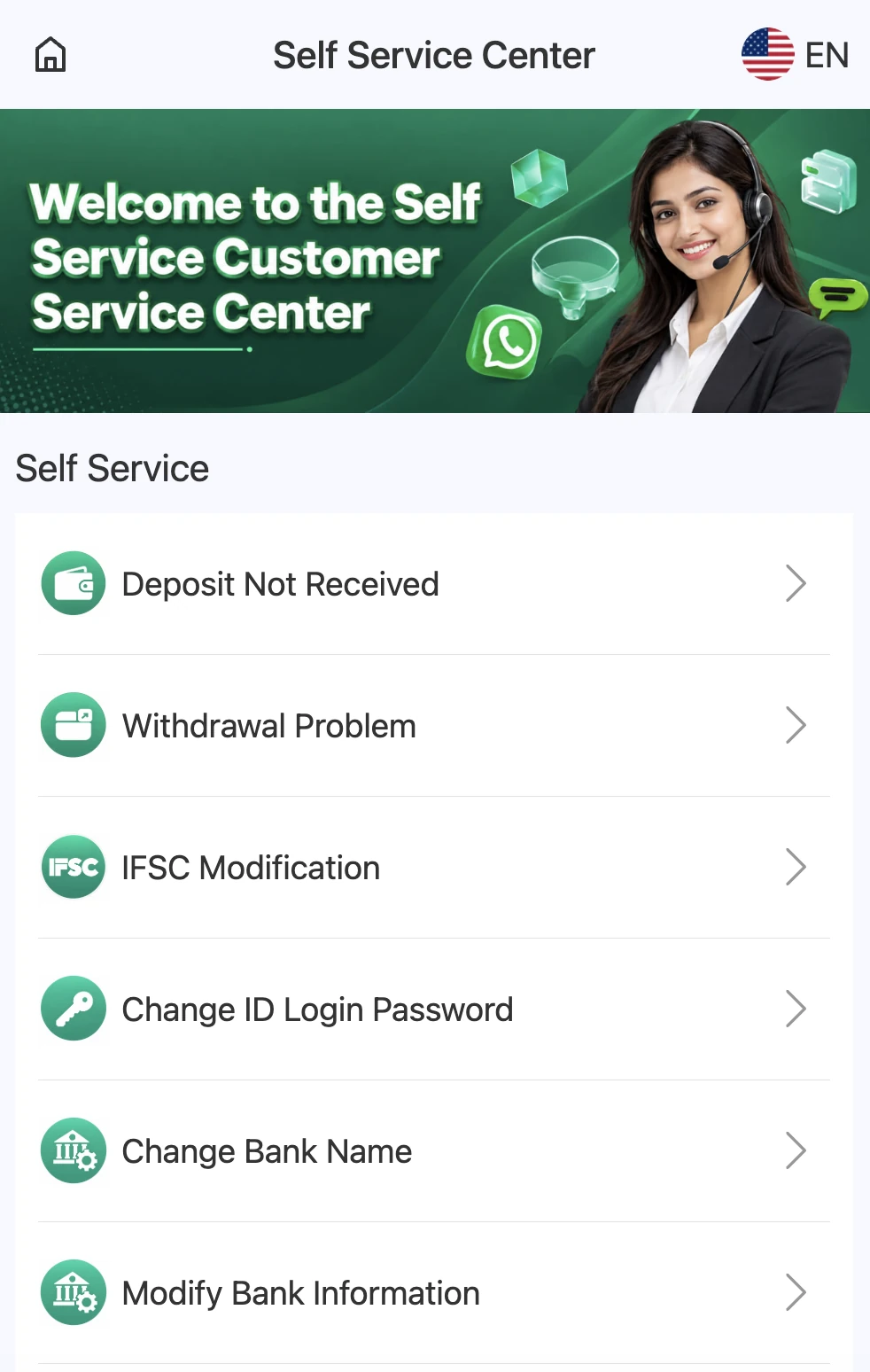
2. Self Service Center
Inside the app, go to Account, then tap Self Service Center. This opens a menu of common issues. You select the relevant issue, fill out a form, and submit. The system routes the query to the right team.
Response time is usually 2 to 24 hours. Self service is best for deposit problems, withdrawal problems, and bank detail changes.
3. Official Telegram Channel
DM First maintains an official Telegram channel. The link is available inside the app and in this website's header. Announcements, gift codes, and event updates are posted there. The channel also has an admin chat for user questions.
Never trust Telegram accounts that claim to be "DM First customer care" but are not linked from the official channel.
4. Agent Line (For Agency Program Members)
Users in the agency program have access to a dedicated Agent Line Customer Service option inside the Agency section. This provides priority support for agency-related queries.
Common Issue Categories
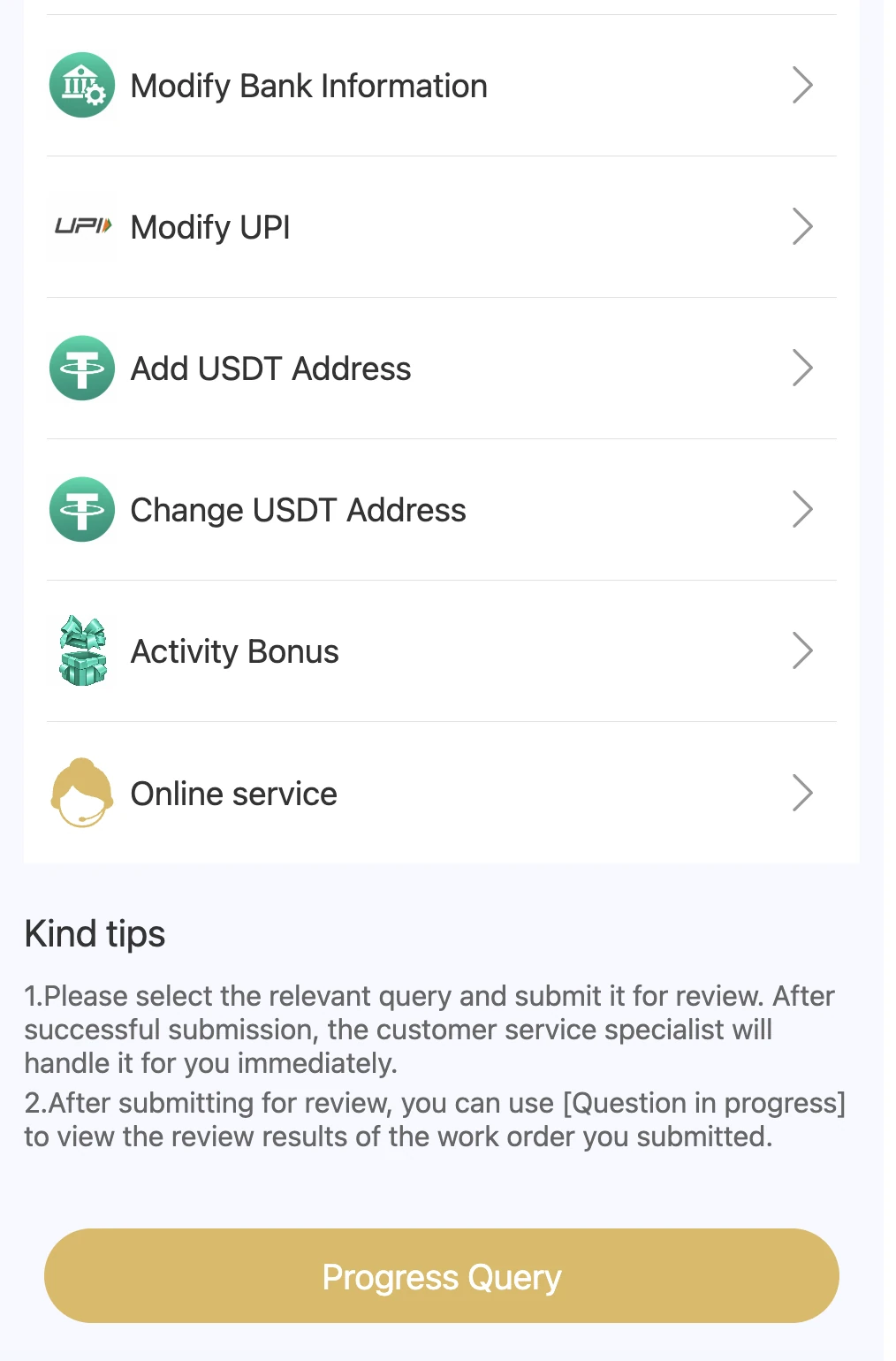
Deposit Not Received
If you transferred money but your wallet was not credited, this is the category to use. Submit:
• Transaction ID or UTR number
• Deposit amount
• Date and time of the transfer
• Screenshot of the payment confirmation
The support team reconciles the deposit manually.
Withdrawal Problem
If your withdrawal is stuck in "Pending" or "Processing" for more than 24 hours, use this category. Submit:
• Withdrawal ID
• Amount
• Bank or UPI details used
• Screenshot of the withdrawal status
IFSC Modification
If your bank's IFSC code has changed (due to a bank merger) or you entered the wrong IFSC, use this category. Submit the correct IFSC with your account details.
Change ID Login Password
If you cannot reset your password through the app (for example, if your registered number has changed), this category helps. You will need to verify your identity.
Change Bank Name
If you want to switch your registered bank account, use this option. Submit new bank details along with verification documents.
Modify Bank Information
For any changes to the existing bank account details (account number, account holder name, branch), use this category.
Modify UPI
To update the UPI ID registered for withdrawals, use this option.
Add / Change USDT Address
For USDT TRC20 wallet changes, use this category. Crypto transactions are irreversible, so verification is strict here.
Activity Bonus Query
If a promotional bonus did not credit or you have a question about bonus eligibility, use this category.
Online Service
For general queries not covered in the above categories, tap Online Service to open a chat with a support representative.
What to Include in Every Support Request
Following this checklist speeds up resolution significantly.
1. Your UID. The unique ID shown in your account profile.
2. Registered mobile number. The number on your account.
3. Transaction reference. UTR number for deposits, withdrawal ID for withdrawals.
4. Screenshot. Bank statement, UPI confirmation, or app screen showing the issue.
5. Specific issue description. One or two sentences explaining exactly what happened.
6. Expected outcome. What you want the support team to do.
Requests with all six items are usually resolved faster than requests missing key information.
Response Times
| Channel | Typical Response | Best For |
|---|---|---|
| Live Chat (Online Service) | 5 to 30 minutes | Urgent queries |
| Self Service Center | 2 to 24 hours | Deposit / withdrawal issues |
| Telegram Channel | Depends on admin availability | General questions |
| Agent Line (Agency) | Fastest for agency members | Agency-related queries |
What Customer Service Cannot Do
Understanding these limits prevents frustration.
They cannot restore lost bets. Once a round completes, results are final. Bets on losing outcomes are not refunded.
They cannot unlock an account without verification. If your account is locked for security reasons, you need to complete verification first.
They cannot change your registered mobile number without proof. Number changes require identity verification.
They cannot reverse a completed withdrawal. Once funds are sent to your bank or UPI, the transaction is final.
They cannot recover funds sent to a wrong account. Always verify beneficiary details before submitting.
Common Issues Users Face
Deposit Not Received After 30 Minutes
Wait 15 more minutes. Then submit a request through the Self Service Center with the UTR number. Most cases are resolved within a few hours.
Withdrawal Pending for Over 24 Hours
Submit a withdrawal problem request. Include the withdrawal ID and screenshot. Bank holidays often cause delays, so check the calendar first.
Cannot Login Due to OTP Issues
See our DM First login with OTP article for common fixes. If the problem persists, use the Self Service Center.
Bank Rejected the Withdrawal
Contact your bank first. If the bank confirms the rejection was not on their side, submit a withdrawal problem request with the bank's response.
Bonus Not Credited
Check the bonus terms. Some bonuses require a minimum turnover before crediting. If the conditions are met and the bonus still did not credit, submit an activity bonus query.
Account Hacked
Change your password immediately if you can still login. If you cannot login, use the Change ID Login Password category with identity verification. Contact customer service right away.
Security Warnings
Never share your password with anyone. Not with someone claiming to be from DM First support. The support team does not need your password.
Never share your OTP. Support will never ask for an OTP. Anyone requesting an OTP is trying to scam you.
Do not trust unofficial Telegram groups. There are many fake DM First groups. Only trust the official channel linked inside the app.
Do not pay anyone for support. All DM First support is free. Anyone asking for payment to "fix" your account is a scammer.
Do not install "support" apps. Never install any third-party app that someone claims will help you with DM First. These are almost always malware.
Frequently Asked Questions
Final Notes
DM First support runs entirely through the app and the official Telegram channel. No phone number. No external email. This keeps things secure and traceable.
For fastest resolution, use the correct Self Service category and include all required details. For urgent issues, use live chat. And never share your password or OTP with anyone claiming to be from support.