Depositing money on DM First is fast and straightforward. The platform supports several payment methods so users across India can add funds using whichever method works best for them. This guide walks you through every method, the exact steps, and how to fix common deposit problems.
If you have not created your account yet, read our DM First register guide.
Deposit Rules on DM First
Before you start, note the basic rules.
Minimum deposit. 100 rupees per transaction.
Maximum deposit. 50,000 rupees per transaction.
Deposit from own account. Only deposit from a UPI or bank account in your own name. Third-party deposits may lead to account suspension.
Match the order amount. If you create an order for 500 rupees, transfer exactly 500 rupees. A different amount will not credit automatically.
Complete the transfer within the time limit. UPI orders expire if not paid within the shown window. If the timer runs out, create a new order.
Do not cancel the order after transferring. Wait for the balance to credit. Cancelling mid-way can cause the deposit to fail.
Payment Methods Available
UPI QR
The easiest method for most users. The app generates a QR code. Open any UPI app on your phone - PhonePe, Google Pay, Paytm, BHIM, or your bank's app - and scan the code. The amount and merchant are already set. Confirm and pay. Balance credits automatically within minutes.
UPI x QR
A slight variation that opens your UPI app directly instead of scanning a QR. Useful if your phone's camera is not working or if you are paying from the same phone that has the DM First app open.
E-Wallet
Deposit through supported e-wallet providers. This works well for users who prefer not to link their bank account directly to the gaming app.
Paytm x QR
Same as UPI QR but specifically routed through Paytm for users who prefer that wallet.
USDT TRC20
Deposit using the stablecoin USDT on the TRC20 network. This is ideal for users who already hold crypto. Transfers usually confirm within a minute. The minimum USDT deposit is 1,030 rupees equivalent.
ARPay
ARPay is a payment gateway that supports UPI. It also offers occasional bonuses for deposits and withdrawals. Some users prefer it because it gives a small cashback on each transaction.
Bank Transfer
For large deposits, direct bank transfer is available. Use the bank details shown in the app. Processing may take longer than UPI, especially on weekends and bank holidays.
Step by Step Deposit Process
Step 1 – Login to DM First
Open the DM First app on your phone. Login with your registered mobile number and password. If you have not logged in before, see our DM First login guide.
Step 2 – Open the Deposit Page
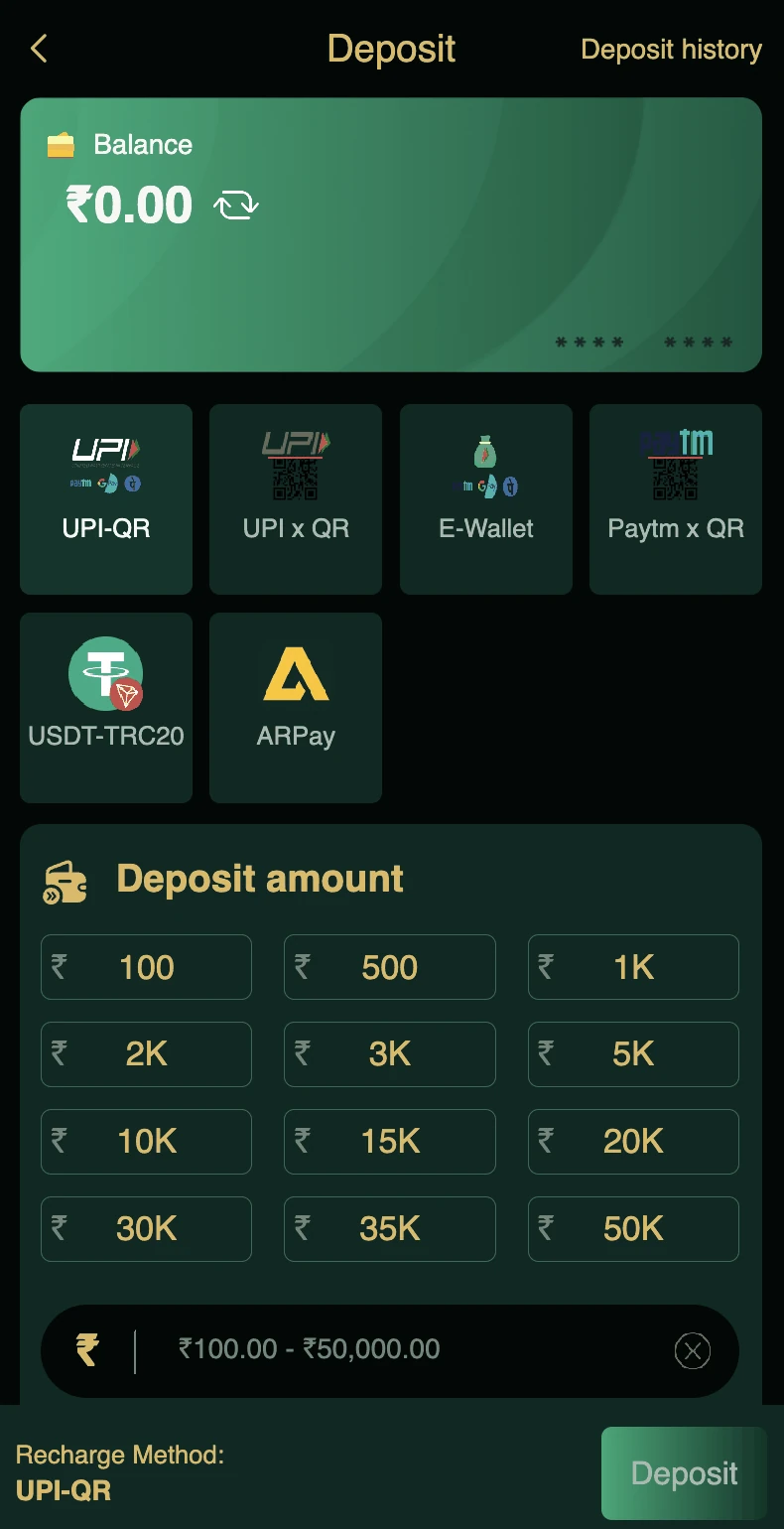
From the home screen, tap your balance at the top, or tap the Deposit option in the bottom navigation. The deposit page opens showing your current balance and payment method options.
Step 3 – Choose a Payment Method
Tap the method you want to use. The page refreshes to show the details for that method. For UPI QR, a code appears. For UPI ID, a UPI address is displayed. For USDT, a wallet address is shown.
Step 4 – Enter the Deposit Amount
Below the payment options, you will see preset amount buttons: 100, 500, 1K, 2K, 3K, 5K, 10K, 15K, 20K, 30K, 35K, and 50K. Tap one, or tap the input field at the bottom and type a custom amount. The amount must be between 100 and 50,000 rupees.
Step 5 – Complete the Payment
For UPI QR: Scan the QR with your UPI app. Enter the amount shown. Confirm.
For UPI ID: Copy the UPI ID. Open your UPI app. Paste the ID. Enter the amount. Confirm.
For USDT: Copy the TRC20 wallet address. Open your crypto wallet. Send exactly the USDT amount. Confirm.
For bank transfer: Copy the account details. Use your bank's net banking or app to transfer. Confirm.
Step 6 – Wait for Credit
Once the transfer is complete, DM First verifies the payment and credits your wallet. This usually takes between ten seconds and five minutes.
You can check the deposit status by tapping Deposit History in the top right of the deposit page.
Common Deposit Problems and Fixes
Deposit Not Credited
Wait fifteen minutes. Sometimes bank confirmations are delayed. If the amount still does not appear, check the deposit history to see if the order is marked pending. If it is, contact customer service with the transaction ID and screenshot.
Wrong Amount Transferred
If you transferred a different amount than the order, the payment will not credit automatically. You will need to contact customer service with the details. The team will reconcile the transaction manually.
Order Expired Before Payment
If you did not pay within the time window, the order expires. Create a new order and complete the payment. If you already transferred the money, do not create a new order. Contact customer service with the transaction ID.
UPI App Fails Mid-Payment
If your UPI app shows a failure, the money should return to your bank within forty-eight hours. Do not retry immediately. Check your bank statement first.
Money Deducted But No Credit
This is a temporary status. Bank networks sometimes delay confirmation. Wait fifteen minutes. If still not credited, contact customer service with the UTR number from your bank statement.
USDT Deposit Not Credited
Check that you used the TRC20 network. USDT on any other network (ERC20, BEP20) will not be credited. If you used TRC20 and the transaction shows confirmed on the blockchain, contact customer service with the transaction hash.
Deposit Blocked by Bank
Some banks block transactions to gaming merchants. If your bank declines the payment, try a different UPI app or a different bank. This is a bank-level restriction, not a DM First issue.
KYC or Verification Required
For large deposits, DM First may ask for verification. Provide your PAN and bank details if prompted. This is normal for financial compliance.
Deposit Instructions to Remember
If the transfer time is up, fill out the deposit form again. Do not reuse the old order.
The transfer amount must match the order amount. A different amount will not credit automatically.
Wrong amount means no automatic credit. The platform is not responsible for the lost amount unless you contact support.
Do not cancel the deposit order after transferring. Wait for the credit.
Deposit Limits and Timing
Minimum per transaction. 100 rupees.
Maximum per transaction. 50,000 rupees.
Credited within. Usually 1 to 5 minutes for UPI. Up to 30 minutes for bank transfer.
Daily deposit limit. Depends on your account level and verification status. Higher VIP levels allow higher limits.
After Deposit – What to Do
Once your wallet balance updates, you can immediately start playing. New users should explore Wingo first. Detailed rules are in our DM First Wingo guide.
If you are a new user, do not forget to claim the welcome bonus and the daily check-in bonus. The invitation code 268471312623 unlocks the maximum welcome bonus for new accounts.
Safety Tips for Deposits
Never share your UPI PIN with anyone. No DM First representative will ever ask for it.
Confirm the merchant name before paying. The UPI app shows the payee name. Make sure it is the correct merchant shown in the DM First app.
Avoid public WiFi for deposits. Use mobile data or home WiFi.
Check your bank statement regularly. Any suspicious transaction should be reported immediately.
Do not screenshot your UPI payment page. Screenshots can reveal sensitive information.
Frequently Asked Questions
Final Words
Depositing money on DM First takes a few minutes. Choose your payment method, enter the amount, complete the payment, and your wallet updates automatically. If anything goes wrong, the fixes above cover nearly every case.
Always deposit from your own bank account or UPI. Never share your UPI PIN. Keep your transaction details safe in case you need to contact customer service.
For more guides, read our DM First withdrawal guide, DM First UPI deposit guide, and DM First game guide.